•  
that horizon might be closer than you think.

Gain access to extensive, world-class online courses and learning content

Welcome to Techshare eLearning Online!
Lessons are accessible 24 hours a day, seven days a week. Be mindful of the announcements and deadlines based on the department’s schedule.
We look forward to having a successful online learning experience with you.

Attention to all users of high quality voice:
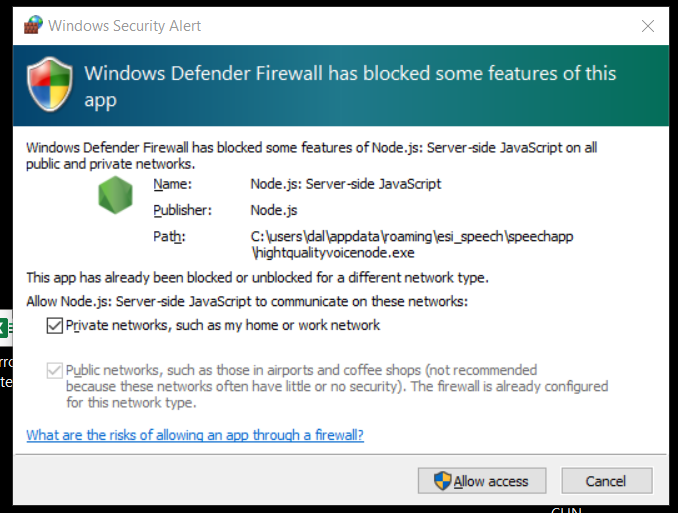
Windows Defender has updated to continue using the high quality voice, please allow access through the firewall. Click here to see the sample Windows Defender alert.

For TOEIC course, please click this link and login your account. toeic.techshare.education

Announcement for Nursing Students
Please be informed that the tentative deadline to complete your Final Module is December 12, 2025, at 5:00 PM.
Kindly ensure that you finish all module activities before this date. A final confirmation of the deadline will be provided if there are any changes.
Thank you for your attention and cooperation.

IMPORTANT ANNOUNCEMENT – NCM101 & MPN301 Summer Classes
Please be guided by the following schedules and deadlines:
NCM101 & MPN301 Finals
  • Final Module Deadline: July 20 (Monday), 11:55 PM
  • NCM101 Final Examination Schedule: July 21, 8:00 PM to 9:00 PM
  • MPN301: There will be no Final Examination.
Important Reminder:
Completion of the required module is mandatory before taking the corresponding examination. Students who fail to complete the module by the deadline will not be allowed to take the exam.
Please submit your modules on or before the deadline to avoid being marked ineligible for the examination.
TO ALL NURSING STUDENTS:

Deadline of Nursing Modules and TOEIC is until May 24, 5:00 PM only.

Special Test schedule is on May 26, 2024. Click the link below to see the complete schedule:
Special Post-Test Schedule

REMINDERS:
  1. Finish the lessons and quizzes on or before the deadline.
  2. Only students who have completed the lessons and quizzes can take the Post-Tests.
  3. Check your account again to ensure that you have finished all the lessons and quizzes.
  4. All tests are accessible and only valid inside the campus.
  5. Strictly follow the schedule.
Important Announcement for Nursing Students: NLE Assessment & TOEIC Module Deadline

This is to inform all concerned students that the deadline for completing the following modules is on May 23, 2025 (Friday), at exactly 5:00 PM:
  • NLE Assessment and Practice
  • TOEIC Module

  • Important Reminder for TOEIC Module Access:
The TOEIC module can only be accessed via the following official platform:
🌐 https://toeic.techshare.education

📌 Please Take Note:

  1. Submissions beyond the deadline will not be accepted.
  2. Unfinished modules will result in unrecorded or incomplete scores.
  3. Ensure you have a stable internet connection and allocate enough time to complete all required sections.
  4. Technical issues near the deadline will not be considered a valid excuse for late submission.
We strongly encourage you to complete the assessments ahead of time to avoid last-minute issues.

For any technical concerns, please reach out through chat support as soon as possible. Online from Monday to Friday, 7 AM to 6 PM.

Thank you for your attention and compliance.

ANNOUNCEMENT:

Please check the schedule below:
Click the subject to see the sections, time and room assignment

PRELIM MODULE DEADLINE AND POST-TEST SCHEDULE:
Level Prelim Module Deadline Date of Exam
NCM112A (Level 3)October 4 (Friday), 5:00 PMOctober 6, 2024
NCM114A (Level 3)October 4 (Friday), 5:00 PMOctober 6, 2024
Special Prelim Exam Schedule (All Subjects):
Please click on the year level to view the list of students eligible for a special exam.
Level Time Room
Level 1 (A to I)Oct 6 (Sun), 8:00 AM - 10:00 AMN2004
Level 1 (J to Q)Oct 6 (Sun), 10:00 AM - 12:00 PMN2004
Level 1 (R to X)Oct 6 (Sun), 1:00 PM - 3:00 PMN2004
Level 1 (Y to AC)Oct 6 (Sun), 8:00 AM - 10:00 AMN2001
Level 2 (All sections)Oct 6 (Sun), 10:00 AM - 12:00 PMN2001
Level 4 (All sections)Oct 6 (Sun), 10:00 AM - 12:00 PMN2001
ANNOUNCEMENT:

Please check the schedule below:
Click the subject to see the sections, time and room assignment

FINAL MODULE DEADLINE AND POST-TEST SCHEDULE:
Level Prelim Module Deadline Date of Exam
MC2 (Level 1)September 20 (Friday), 5:00 PMSeptember 22, 2024
NCM100 (Level 1)September 20 (Friday), 5:00 PMSeptember 22, 2024
NCM104A (Level 2)September 27 (Friday), 5:00 PMSeptember 29, 2024
NCM106A (Level 2)September 27 (Friday), 5:00 PMSeptember 29, 2024
NCM107A (Level 2)September 27 (Friday), 5:00 PMSeptember 29, 2024
NCM112A (Level 3)October 4 (Friday), 5:00 PMOctober 6, 2024
NCM114A (Level 3)October 4 (Friday), 5:00 PMOctober 6, 2024
NCM118A (Level 4)September 20 (Friday), 5:00 PMSeptember 22, 2024
NCM119A (Level 4)September 20 (Friday), 5:00 PMSeptember 22, 2024
MPN412 (Level 4)September 20 (Friday), 5:00 PMN/A
REMINDERS:

  1. Finish the lessons and quizzes on or before the deadline.
  2. Only students who have completed the Final lessons and quizzes can take the Final Post-Test.
  3. Check your account again to ensure that you have finished all the Final lessons and quizzes.
  4. All tests are accessible and only valid inside the campus.
  5. Strictly follow the schedule.

CLICK THE LINKS BELOW TO SEE THE POST-TEST SCHEDULE:
FINALS
LEVEL 1 - (MC2)
LEVEL 1 - (NCM100)
LEVEL 2 - (NCM104A)
LEVEL 2 - (NCM107A)
LEVEL 3 - (NCM112A)
LEVEL 3 - (NCM114A)
LEVEL 4 - (NCM118A)

Tests can only be taken in UC labs/rooms. Follow the schedule and make sure to come to school to take the test.
TO ALL NURSING STUDENTS: (Update as of Oct 5)
  • All Nursing Students may now start the online TOEIC course using this link.
Please click the links below to see the Prelim Post-Test Schedule:
  • Level 1 - MC2
  • Level 1 - NCM100
  • Level 2 - NCM104A
  • Level 2 - NCM107A
  • Level 3 - NCM112A
  • Level 3 - NCM114A
  • Level 4 - NCM118A
Please take note that the Prelim Post-Test will be conducted online and will still follow the specific schedule given. Check the above list to see your schedule.

Important Reminders:
  • Prelim Lessons and Quizzes will be accessible on October 8 (Sunday) from 12 AM to 11:55 PM only.
  • Unfinished quizzes will be marked as 0.

TO ALL 4TH YEAR NURSING STUDENTS:
MPN412 Prelim Lessons deadline is until October 6 (Friday).

SIGN IN

 
 FAQs

sign up

 
Already have an account? Log in

Students Served

965,025

Learning Hours Served

17,012,815

Exercises & Questions Developed

1,000,000+

Frequently Asked Questions

You can also download a powerpoint copy here.

Why is it invalid login?

Possible causes:

  • Incorrect Techshare website
    • Make sure you visit the correct website depending on what school you are enrolled in.

    • Proper format: your school initial + techshare.education

      • Examples:
        • uc.techshare.education
        • ue.techshare.education
        • ub.techshare.education
  • Incorrect spelling, capitalization, extra spaces, and number combination.
    • Proper format:
      • Username: Student ID number
      • Password: Last name + 3 random digits
  • TOEIC Users should login to:
    • toeic.techshare.education

Why does it say Another Log has been detected?

Possible causes:

  • If another login has been detected, it means you didn't log out of your account properly.

  • Somebody logged into your account without your knowledge.

To proceed, just click the logout button.

If a change of password is available, you may change it for security purposes.

I don’t have a Techshare eLearning account. Is it possible for me to create one?

It is not allowed for you to create one for yourself. Techshare will create one for you. Kindly send us a message through chat support.

The login credentials of the students are distributed to the students privately. Please coordinate with your teacher or instructor and ask for your login credentials.

If you are new enrollee and your teacher or instructor informed you that your name is not included in the list, message us through chat support and provide us your registration form or any document that shows the subjects enrolled. This is for verification and encoding purposes for us to create you a new account.

As long as you are enrolled in your school, you will need your login credentials to access your Techshare modules, so always remember them.

Chat support is available from Monday to Friday, 7:00 AM to 6:00 PM only.

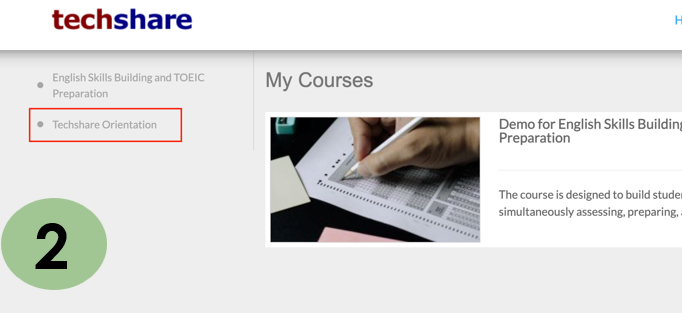
Where can I find the Techshare Orientation?

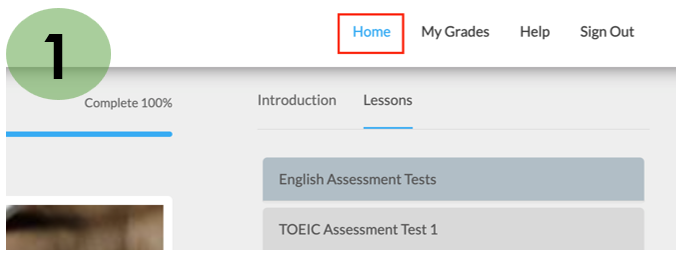
Click Home. For Windows/Mac devices, you will see it on the left side; for Android mobile and tablet, you will select it from a drop-down menu.


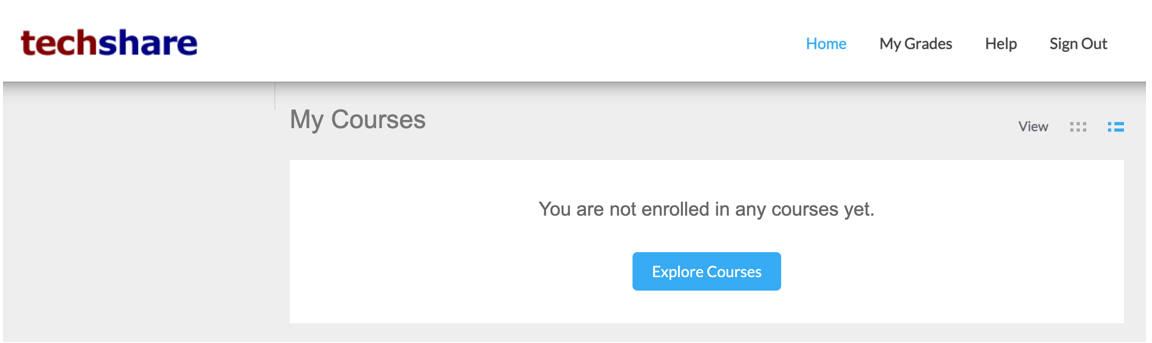
What does "You are not enrolled in any courses" mean?


Possible causes:

  • You might be a late enrollee.

    • Just message our specialist through chat support and present your registration form for verification.

  • Outdated internet browser. Update your internet browser, reopen then try to login again.

What's the purpose of the penalty in the module?

The design of the system is structured and well-organized. There are competency exercises available for each topic. This means that you must complete the competency exercises with a perfect score before moving on to the next topic.

If you are not able to answer the questions perfectly after trying three times, the system will automatically give you a 5-minute penalty or a 5-minute waiting time before you can answer the competency exercises again.

To effectively receive a perfect score, it is best to review and comprehend the material within this 5-minute waiting period.

What does "media blocked" mean?

This means that you need to allow the system to use your microphone.

  • If the pop-up for microphone setup doesn't show up automatically, check the Settings of your internet browser.

  • For Google Chrome (windows)

    1. Click the Customize and control Google Chrome button (3 dots icon) located at the upper right of the menu bar then choose Settings > Privacy and Security > Site settings.

    2. Check the system's website address if it is allowed to use your microphone.

    3. Click the arrow and set Allow for the microphone.

  • For Google Chrome (Android)

    1. Click the Customize and control Google Chrome button (3 dots icon) located at the upper right of the menu bar then choose Settings > Site settings.

    2. Check the system's website address if it is allowed to use your microphone.

    3. Click the arrow and set Allow for the microphone.

  • For Mozilla Firefox:

    1. Click the Open application menu button (3 lines icon) located at the upper right of the menu bar then choose Privacy and Security.

    2. Go to Permissions and check the Settings for Microphone.

    3. Look for the system's website address and choose Allow then Save Changes.

Why is my voice not recognized by the system?

Possible causes:

  • Defective microphone.

  • Headset is not properly attached into the device.

  • Headset or earphones don’t have microphone.

You can also test if your microphone is working by visiting this site:

  • https://online-voice-recorder.com

If your microphone is working properly, you should be able to record your voice clearly.

For windows devices, please download the local speech recognizer before accessing the module. The local speech recognizer installer is available upon opening the speech activity.

Your system is requesting that I download a specific kind of software on my device. Is it secure?

It is completely safe to use any of the software that our system asks you to download and install.

Any of these installers will help you to have better learning experience.

"Adobe Flash Player is no longer supported." What should I do next?

Place Settings lesson requires you to use Google Chrome as your internet browser.

Upon logging in your account, a pop-up window will appear and will ask you to download the portable Google Chrome. Before you download it, click the video link on how to install and how to use the portable Google Chrome.

Portable Google Chrome only works in Windows devices.

What does free study mean? Do they all need to be finished?

Free study is optional.

If you wish to review a lesson that shows you need more improvement, free study is the best option for review.

You will have access to all of the lessons, which will provide you with further knowledge.

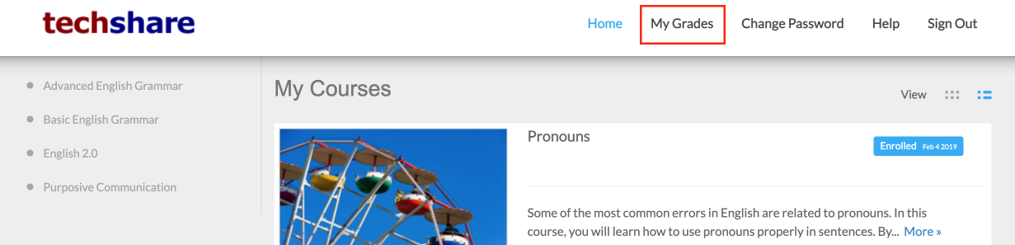
Where can I see my grades?

You can see the raw scores of your post-quizzes and post-tests by clicking the My Grades in the main menu of the system.


The Techshare eLearning will only submit the raw scores to the department or to the assigned teacher or instructor. If you have any clarifications regarding the integration and computation of scores, it is best to coordinate this concern to them.

I sent out several queries during the night. Why am I not receiving a response or answer to my questions on direct chat?

Techshare eLearning online chat support is available from Monday to Friday, 7 AM to 6 PM only. On weekends, holidays, and after 6 PM, the online chat support will be unavailable and tagged as offline.

For the offline inquiries, it is best to give the complete details of the concern, and if possible, include screenshots or recordings to help us identify the issue immediately.

A response will only be sent to you through your email provided after the Techshare eLearning Specialists are back online.

I sent an offline message, and I never got an email response.

Make sure that you provided us the correct and valid email address.

If the email address is invalid or nonexistent, the email will bounce back.

Even after following all the guidelines in the FAQs, I'm still unable to continue. How should I proceed?

It is best to communicate with us through chat support during online hours, from 7:00 AM to 6:00 PM, weekdays only (except holidays).

If the problem hasn't been resolved yet, make sure you don't quit the Techshare chat window or close the browser.

If the issue is not resolved through chat, our chat support representative offers a one-on-one video conference (without opening the camera) to see the actual issue in a real-time manner.